.svg)
.png)


.avif)
The market for artificial intelligence and computer vision is growing quickly. According to Precedence Research, it reached $22.93 billion in 2024 and is expected to hit $330.42 billion by 2034. Machines that can "see" are now a business priority, not just a research experiment.
For engineering leads and CTOs, understanding computer vision from raw pixels to deployed systems can be confusing. Many teams know what it does, but fewer understand the full workflow, the best techniques for their use case, or what it takes to move from prototype to reliable production.
This article explains computer vision step by step. We cover the end-to-end workflow, core techniques, industry applications, and how Azumo helps teams build and deploy these systems efficiently.
What Is Computer Vision in AI?
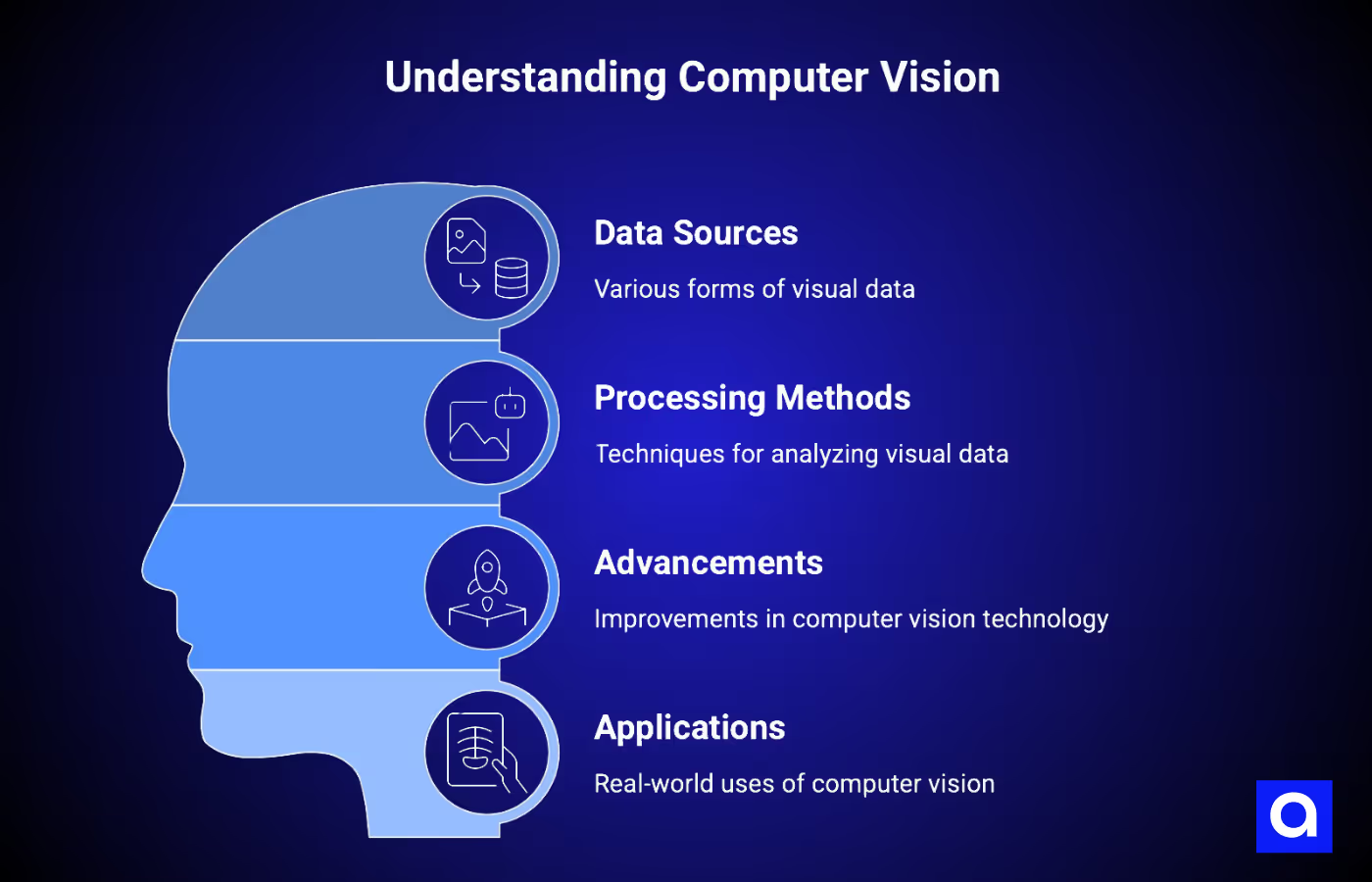
Computer vision is the branch of artificial intelligence that allows machines to interpret, analyze, and act on visual data. This data can come from photos, videos, medical scans, satellite images, scanned documents, or live camera feeds from a factory floor.
A computer vision system does not "see" like humans. It converts images into numbers and learns patterns from them. For example, a convolutional neural network processes an image through layers that detect edges, textures, shapes, and objects. Newer models like Vision Transformers split the image into patches and use self-attention so every patch can relate to every other patch from the first layer, which helps capture long-range relationships in complex scenes.
Computer vision has advanced a lot. In the past, it relied on hand-crafted rules and manually defined features. Today, computer vision models can match or surpass human accuracy in tasks like detecting tumors in medical scans or spotting defects on a production line.
How Computer Vision Works: Our End-to-End Workflow
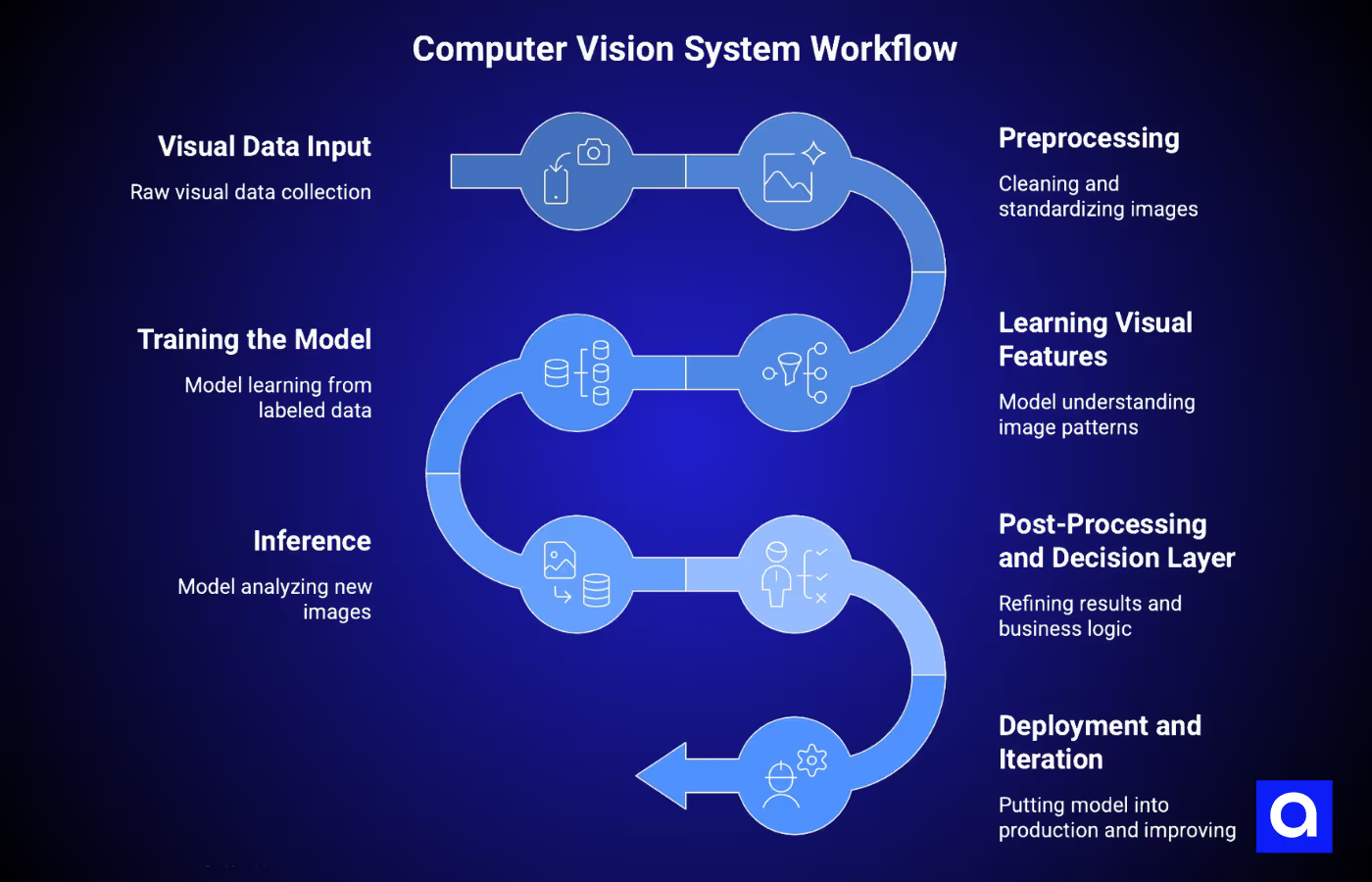
Many teams focus only on the model and overlook the rest of the pipeline. The model, or computer vision algorithm, is just one part of a successful system. Data input, preprocessing, training, post-processing, and deployment all matter. If you skip any of these steps, the algorithm might work in a notebook but fail when used in real-world production.
Let's walk through each step.
1) Visual Data Input
Every computer vision system starts with raw visual data. This can come from cameras, 3D sensors, video feeds, medical scans, satellite images, or dashcams, depending on your project.
When we work with our clients, the first thing we check is data quality. Lighting, resolution, frame rate, and angles all affect how well the model will learn. You also need variety in your dataset.
For example, if you train a defect detection model under one lighting setup and then deploy it in a different factory environment, the results will drop. Collecting diverse and representative data from the start prevents problems later.
2) Preprocessing
Raw images rarely go straight into a model. We usually clean and standardize them first. That can include reducing noise, normalizing pixel values, and using data augmentation like rotations, flips, and crops to make the dataset more robust.
Sometimes we also crop images to focus on the important parts. For instance, when inspecting circuit boards, removing the conveyor belt background helps the model focus on what matters. Preprocessing ensures your model sees consistent, clean inputs and can learn the right patterns.
3) Learning Visual Features
This is where the model starts to understand your images. In a convolutional neural network, early layers detect edges and corners, and deeper layers combine these into textures, shapes, and eventually full objects. The model builds this feature hierarchy automatically, which saves a lot of time compared to older approaches where engineers had to design features manually.
Vision Transformers work a little differently. They split the image into patches and learn how each part relates to the others. This is great for complex scenes. In many modern systems, we combine CNNs for feature extraction with Transformers for reasoning, so we get both detail and context.
4) Training the Model
Training is where the model learns to turn images into meaningful outputs. You feed it labeled data, and a loss function measures how far off its predictions are from the correct labels. The model adjusts its internal weights over thousands of iterations to improve.
We pay special attention to settings like batch size and learning rate, and we apply regularization techniques such as dropout, weight decay (L2), and early stopping to prevent overfitting. Transfer learning is also common. Starting from a pre-trained backbone like ResNet, EfficientNet, or a ViT for classification or from a pre-trained YOLO / Mask R-CNN for detection and segmentation can save significant training time and reduce the amount of labeled data you need. At Azumo, we use tools like MLflow to track experiments, compare runs, and make training more reliable.
5) Inference: Turning Images Into Outputs
After training, the model can analyze new, unseen images and produce predictions. Depending on the task, these outputs may be class labels for image classification, bounding boxes with labels and confidence scores for object detection, pixel-level masks for segmentation, or extracted text for OCR.
Processing speed is very important in production environments. For example, manufacturing-line inspection typically targets 50–200 ms per frame, while autonomous-vehicle perception usually needs to run under 50 ms per frame so the full perception–planning–control pipeline can fit inside roughly 100 ms. Slower processing can create bottlenecks and affect overall system performance.
6) Post-Processing and Decision Layer
The raw outputs from a model rarely provide actionable results on their own. Post-processing steps, such as non-max suppression to remove duplicate detections or confidence thresholding to filter low-probability predictions, refine the results and reduce errors.
Next comes the business logic layer, which turns model outputs into real-world actions. For example, a detected defect might stop a production line, a flagged medical anomaly could be routed to a radiologist for review, or a recognized face could unlock a secure door. This step is where computer vision moves beyond research and begins delivering tangible value for your business.
7) Deployment and Iteration
Deployment involves putting the trained model into a live environment where it can process real-world data. You can deploy on cloud platforms like AWS Rekognition, Azure Computer Vision, or Google Cloud Vision for scalable inference, or on edge devices when low latency is required, or data cannot leave the device.
One of the most important aspects of deployment is creating a feedback loop. Real-world data often exposes cases that the model has not encountered before. By capturing these edge cases, labeling them, and incorporating them back into retraining cycles, the system can continue improving over time. A
At Azumo, we typically start with a Discovery phase to assess your data and feasibility, move to a POC or MVP to validate the approach, and then scale to full deployment with continuous experiment tracking using MLflow.
What Are The Core Computer Vision Techniques?
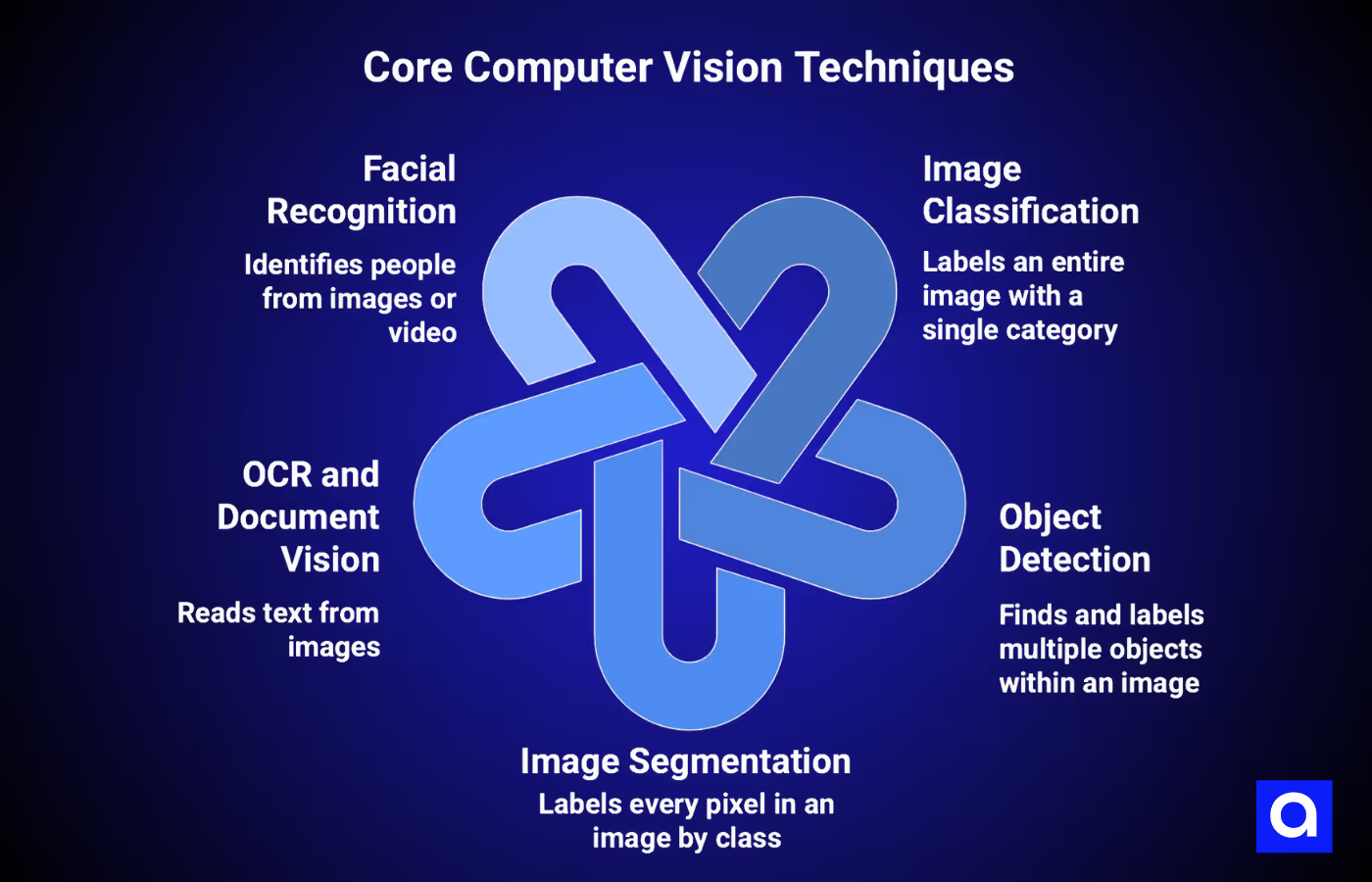
Different tasks need different computer vision techniques. Here are the five most common ones and what they do:
Image Classification
This technique labels a whole image with a single category. For example, it can tell whether a scan shows a tumor or not, or if a product is defective. Models like ResNet, EfficientNet, ConvNeXt, and Vision Transformers (ViT, Swin) are commonly used; MobileNet and MobileViT are common when latency or on-device inference matters. While it sounds simple, getting accurate results requires good data and careful model setup.
Object Detection
Object detection finds and labels multiple objects inside one image. It draws boxes around each object and gives it a class name with a confidence score. Single-stage detectors like YOLO (current versions YOLOv8–YOLO11) and RT-DETR offer the best speed/accuracy trade-off and are the default choice in production. Two-stage detectors like Faster R-CNN remain useful for offline tasks where small-object precision matters more than throughput.
Additionally, object detection is used for things like counting items in a warehouse or detecting pedestrians in self-driving cars.
Image Segmentation
Segmentation labels every pixel in an image. Semantic segmentation tags pixels by class, like marking all tumor areas in a scan. Instance segmentation also separates objects of the same type, for example, distinguishing two overlapping tumors, or each person in a crowded scene, or each car in a parking lot. Models like U-Net, Mask R-CNN, and SAM are popular here. Segmentation is common in medical imaging and quality inspection.
OCR and Document Vision
OCR (Optical Character Recognition) reads text from images, whether printed, handwritten, or damaged. Modern systems use combinations of CNNs and Transformers to turn images into text. OCR helps with invoices, ID verification, labels, and document digitization. At Azumo, OCR is part of our computer vision development services, helping companies automate document processing and extract useful information from visual data.
Facial Recognition
Facial recognition identifies people from images or video. It is used for secure access, fraud prevention, and patient identification. Care is needed because models can make more mistakes with underrepresented groups. Responsible systems require diverse data, bias checks, transparency, consent, and privacy compliance.
Many of these techniques rely on computer vision and machine learning working together: preprocessing the images, training models, and refining predictions so systems can make accurate decisions in the real world.
Other methods include pose estimation, depth estimation, anomaly detection, visual search, and scene understanding, all helping machines interpret images and act intelligently.
Where Is Computer Vision Used?
Medical Imaging and Healthcare
Healthcare is one of the fastest-growing areas for computer vision. The market was worth $2.6 billion in 2024 and is expected to reach $53 billion by 2034. Computer vision helps detect diseases quickly and accurately. For example, AI models can identify lung nodules in CT scans with accuracy comparable to experienced radiologists. Hospitals and clinics use it for MRI and CT analysis, tumor segmentation, diabetic retinopathy screening, surgical instrument tracking, and monitoring ICU patients.
Defect Detection and Quality Control
Manufacturers benefit immediately from computer vision. Traditional inspections detect roughly 70–80% of defects, while AI-powered systems reach 98–99% detection.
Companies like BMW cut defect rates by almost 40% using vision systems on painted surfaces. Intel saves millions annually using wafer inspection, and food processors reduce product recalls by up to 78%. Most factories see a return on investment within a year or so.
Self-Driving and Autonomy
Computer vision is the eyes of autonomous vehicles. The market was valued at $23.36 billion in 2024 and is projected to reach $65.3 billion by 2033. More than half of the new vehicles sold in 2024 included advanced driver-assistance systems. Systems like Waymo’s self-driving cars have reduced crashes by 80% compared to human drivers. Cameras and CV models read lane markings and traffic signs and classify pedestrians, while LiDAR provides 3D distance information and RADAR provides velocity and range, especially in poor visibility. Sensor fusion combines all three to avoid collisions in real time.
AR and Interactive Experiences
Computer vision powers augmented reality. The AR market is expected to grow from $35.8 billion in 2024 to $233.3 billion by 2030. CV enables object recognition, gesture tracking, spatial mapping, and environmental anchoring. For consumers, this means virtual try-on for fashion, interactive games, and AR navigation. In enterprise and healthcare, it supports AR-guided maintenance, industrial training, and surgical navigation. For example, the Zeta Cranial Navigation System uses CV to guide neurosurgery with submillimeter accuracy without rigid head fixation.
How Azumo Helps Teams Implement Computer Vision
Azumo has been building AI systems, including computer vision, since 2016. We have delivered over 100 AI projects under SOC 2 compliance for clients like Meta, Discovery Channel, and Stovell AI. Our experience covers the full range of CV tasks, and we have real computer vision examples across object detection, image classification, segmentation, OCR and document vision, facial recognition, visual search, scene understanding, and super resolution.
Our process starts with a paid 2 to 3-week Discovery phase to check data readiness, infrastructure, and use case feasibility. This helps reduce risk and ensures everyone understands what will be built and why. From there, we create a POC or MVP to show value quickly, then scale to full deployment.
On the technology side, we build models with PyTorch and TensorFlow, track experiments with MLflow, and deploy across AWS, Azure, and Google Cloud. Our nearshore team in Latin America works in US time zones, so you get real-time collaboration with no delays. With our AI development services, you can engage a single AI developer, a dedicated team, or senior technical leadership, depending on your project.
If you are exploring computer vision for your product or operations, a quick conversation with our team can help you see how CV fits, what data you need, and how fast you can move to production.
Frequently Asked Questions

About the Author:
AI/ML Engineer
Jorge Sandoval is a Senior AI/ML Engineer with a Ph.D. in Decision Models and over a decade of experience shipping production AI systems.


.avif)