.svg)
.png)


.avif)
Imagine a world where development moves faster, yet quality never suffers. Developers complete tasks up to 55% faster with AI coding assistants (GitHub Copilot study). AI does not replace the expert developer. It amplifies one. The stronger the engineer, the greater the impact of AI tooling.
The software industry is in the midst of its most dramatic productivity shift in decades. From intelligent autocomplete to full prompt-driven code generation, AI coding tools are now part of professional workflows at every scale, from solo founders to Fortune 500 engineering teams.
This guide provides a clear perspective. Rather than framing “vibe coding” and “traditional coding” as competing philosophies, we treat them as opposite ends of a spectrum defined by one key factor: how much human architectural intent governs the output. We explore the strengths and risks of each approach and show how experienced developers can use AI to compress timelines while improving quality.
The takeaway is simple. Development teams that get the most from AI are not those using it to bypass engineering discipline. They are the ones who use disciplined engineering to guide it.
What Is Vibe Coding and Prompt-Driven Development?
The term “vibe coding” was coined by Andrej Karpathy in early 2025 to describe an experimental personal workflow: speak a request, let an AI write the code, accept the output, feed errors back to the AI, and iterate without deeply reading the generated code. Karpathy was explicit that this was an exploratory mode, describing it as letting the code “grow beyond my usual understanding.”
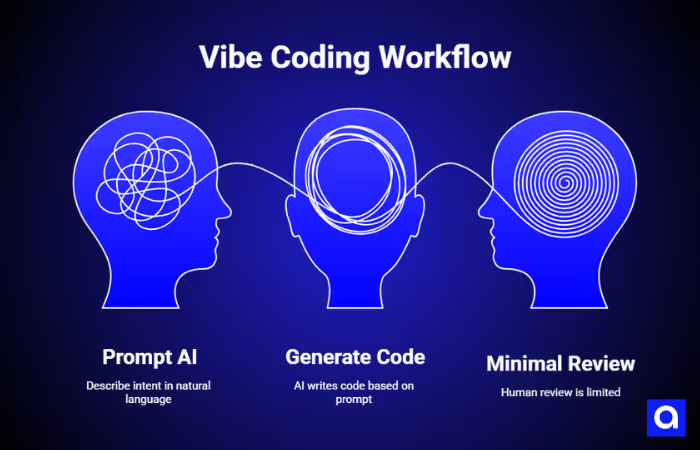
In practice, “vibe coding” refers to the prompt-first end of the spectrum: the developer describes intent in natural language, the AI generates code, and human review is minimal or absent. This approach has genuine use cases as a specific mode of working, and not a description of AI-assisted development broadly.
What Is Traditional Coding?
Traditional coding means a developer writes every line with full ownership: gathering requirements, designing the system, implementing it, testing it, deploying it, and maintaining it over time. The developer can explain every function and every architectural decision. Human judgment governs everything.
This is not a museum piece. It is still the right approach for large-scale systems, regulated industries, safety-critical applications, and any project where a bug can cause serious harm. But it is also slower, and it carries its own quality risks; human-written codebases routinely accumulate technical debt, suffer from inconsistent architecture, and contain security vulnerabilities.
The Real Spectrum: AI Governance Maturity
The meaningful distinction is not AI versus no-AI. Nearly every professional developer in 2025 uses AI assistance in some form, such as autocomplete, code review, test generation, documentation, and refactoring. The real variable is governance: how much structured human intent shapes the AI’s output.
The optimal mode for most professional teams is “Architect-led AI”, where AI operates inside a framework of architectural rules, code standards, and review processes defined by experienced engineers. This is neither pure vibe coding nor pure traditional development. It is the mode that delivers the largest gains in velocity without sacrificing quality or safety.
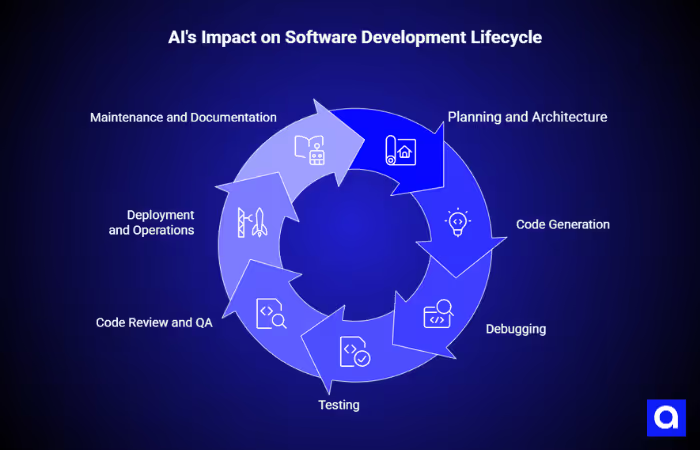
How Does AI Change Each Stage of Development?
The impact of AI varies significantly across the software development lifecycle. Understanding where it accelerates, where it requires oversight, and where human judgment is irreplaceable is essential to using it well.
Planning and Architecture
Traditional planning is thorough but slow. Teams gather requirements, draw system diagrams, write technical specifications, and model scaling and security constraints before writing a line of code.
AI changes what is possible in this phase, but does not change what is required. An experienced architect can use AI to draft a technical specification from a conversation, generate an initial data model, identify edge cases, or produce a threat model in a fraction of the time. The AI accelerates the artifact creation; the architect provides the judgment.
A common mistake is skipping architecture because AI can generate code quickly.
In practice, prompts still act as specifications, but they are informal, difficult to trace, and usually not version-controlled. Avoiding upfront design does not remove design decisions. It simply pushes them into the AI’s output, where they become much harder to review, audit, and revise later.
For any project intended to scale, handle sensitive data, or operate in a regulated environment, upfront architecture remains non-negotiable. AI can dramatically reduce the cost of producing that architecture, but it cannot replace the judgment required to produce it well.
Code Generation
This is one of the clearest areas where AI can improve developer productivity. Research has shown that developers using AI assistance can complete coding tasks significantly faster than those working without it. In practice, that speed shows up most clearly in repetitive or structured work such as boilerplate, data access layers, validation logic, API integrations, and unit test scaffolding, where AI can help developers move from setup to review much faster.
At the same time, widely repeated claims about how much code AI writes can be misleading. They often combine two very different workflows: developers accepting AI suggestions inside a normal coding process, and prompt-driven code generation with minimal human review. Those are not the same thing, and they should not be treated as if they are.
The volume of AI-assisted output does not tell us much about code quality, architectural consistency, or governance. What matters more is not how much code the AI produced, but how clearly that code was guided by sound engineering judgment.
Debugging
The document that inspired this guide suggests that debugging is fundamentally broken when AI writes the code because “the developer did not write the code.” This framing is worth examining.
Professional developers routinely debug code they did not write: inherited codebases, open source libraries, third-party SDKs, and teammates’ code. What makes debugging tractable is not authorship; it is observability, typed interfaces, architectural boundaries, and test coverage.
These can be mandated for AI-generated code just as easily as for human-written code.
In architect-led AI workflows, AI-generated code is constrained to follow the same layer separation, naming conventions, and interface contracts as everything else in the system. When a bug appears, the debugging process is the same as it would be for any code: read the error, trace the execution, and find the root cause.
Testing
One of the most common misconceptions about AI-assisted development is that it leads to untested code. In reality, that comes down to workflow, not a limitation of the technology itself.
AI can be extremely effective at generating tests.
When given a function signature and a clear description of expected behavior, it can produce unit tests, edge case scenarios, and even integration test scaffolding in seconds. Teams that make validation and testing part of the prompt from the start, and require the AI to generate tests alongside the implementation, can often reach solid test coverage much faster than teams writing everything manually.
A stronger approach is to treat test generation as a required part of every implementation prompt. Coverage expectations should be defined in the team’s engineering standards and enforced through CI. The AI can handle speed and volume, but the engineer still sets the bar for quality.
Security also needs to be framed correctly. AI-generated code can introduce vulnerabilities, but so can human-written code. The real issue is not simply the presence of flaws. It is the team’s ability to catch them through clear architectural guardrails, code review, automated scanning, and disciplined testing. AI does not remove the need for secure development practices. It makes those practices even more important.
Code Review and QA
Code review in AI-assisted workflows requires a shift in mindset. Reviewers are no longer checking whether every line follows the project’s conventions; they are checking whether the AI’s output conforms to the architectural rules that were defined in advance.
This is actually a stronger form of review. When architectural rules are explicit, how layers are separated, how dependencies flow, how errors are handled, and what security controls must be present, review becomes a structured conformance check rather than an open-ended judgment call.
AI can assist with this too: automated static analysis, AI-powered code review tools, and dependency scanning can catch the most common failure modes before human review begins.
Deployment and Operations
AI-powered platforms that offer one-click deployment, such as Replit, Lovable, and Bolt, are generally suitable for prototypes and low-stakes internal tools. However, for production systems, a full CI/CD pipeline remains essential. In particular, environment promotion, automated test gates, rollback procedures, and observability infrastructure cannot be safely skipped.
Similarly, concerns about resource efficiency, including claims that AI-generated apps consume “3-4 times more server resources,” are plausible as a general observation of unconstrained, prompt-driven generation. Yet, specific numbers should be treated cautiously unless supported by clear methodology and controls. In practice, AI prioritizes correctness and simplicity over performance unless explicitly guided.
Therefore, the solution is straightforward. Define performance requirements in your architectural rules and include them in your prompt constraints.
Maintenance and Documentation
AI tools can also generate documentation. Docstrings, README files, API references, architecture decision records, and onboarding guides can all be produced or updated as part of the development workflow. When documentation is missing in prompt-driven projects, it reflects a process failure, not a limitation of the tooling.
Maintenance is where poorly governed AI-generated code tends to accumulate the most technical debt. Without clear architectural rules, each AI generation session can introduce subtle variations, inconsistent naming conventions, and duplicated logic. Over time, this makes the codebase harder to navigate and more costly to modify.
This problem is not inherent to AI-generated code. It arises from producing code without a consistent architectural framework. Teams that establish and enforce rules through structured prompts, linting, code review checklists, and CI gates find that AI-generated code is no harder to maintain than human-written code and is often more consistent.
When to Use Each Mode
Choosing the right development mode depends less on ideology and more on risk, complexity, and business intent. Each approach, from prompt-driven experimentation to architect-led AI and fully traditional development, has a valid place when matched to the right type of project.
The key is knowing when speed is enough, when structure becomes essential, and when full human control is non-negotiable.
Pure Prompt-Driven Development (High-Velocity Exploration)
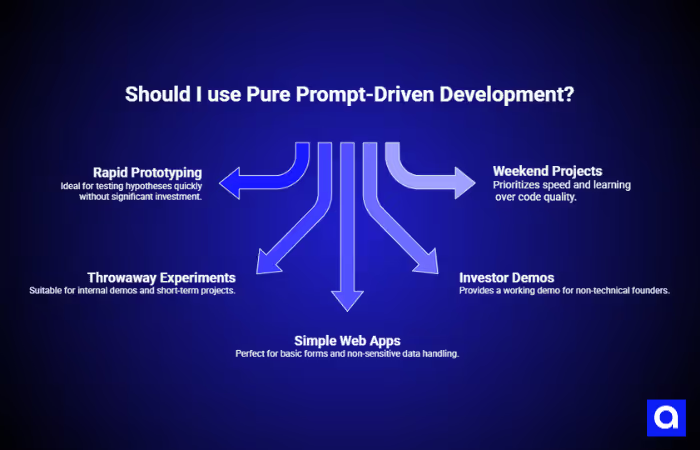
Prompt-driven development with minimal human review is genuinely the right approach in specific contexts. It is fast, accessible to non-technical users, and ideal for validating ideas before investing in engineering resources.
Use this mode for:
- Rapid prototypes and MVPs where the goal is to test a hypothesis, not build a product
- Throwaway experiments and internal demos
- Landing pages, simple forms, and self-contained web apps that handle no sensitive data
- Non-technical founders who need a working demo to show investors
- Weekend projects where learning and speed matter more than code quality.
The moment a prompt-driven prototype needs to handle real user data, scale beyond a handful of users, enter a regulated domain, or become a product someone pays for, it needs to transition to an architect-led workflow. This transition is the most common point of failure for AI-first startups.
Architect-Led AI Development (Professional Mode)
This is the mode that delivers the most value for professional teams. An experienced engineer or architect defines the system’s structure: how the layers are organized, how dependencies flow, what patterns are used, and what security controls are required. AI operates within that structure, accelerating implementation without eroding its integrity.
Use this mode for:
- Products intended for real users and eventual monetization
- Systems that will grow, need to scale, or require long-term maintenance
- Any application that handles personal or sensitive data
- Regulated industries where compliance is mandatory
- Teams that want to maximize developer velocity without accumulating architectural debt.
Traditional Development (Precision Mode)
Full human ownership of every line remains the right choice when the cost of a mistake is unacceptably high: financial transaction systems, medical devices, safety-critical infrastructure, and applications where a security flaw could cause irreversible harm.
Even in these contexts, AI can play a supporting role, reviewing code, generating test cases, scanning for vulnerabilities, and producing documentation, without being the primary author of production code.
The Developer’s Role in AI-Augmented Teams
AI changes how code gets written, but it does not reduce the importance of engineering skill. In fact, it makes judgment, architectural thinking, and technical oversight even more valuable.
To understand where AI creates the most leverage, you have to look at how it changes the role of senior engineers, architects, and junior developers across the team.
Why Do Strong Engineers Get More from AI?
The counterintuitive finding from teams that have deeply integrated AI tooling is this: the more experienced the engineer, the greater the productivity gain. This is the opposite of what the “AI replaces developers” narrative would predict.
The reason is straightforward. AI code generation is, in effect, a very fast junior developer: it can produce a lot of code quickly, it knows common patterns, and it makes fewer syntax errors than a human. But it has no architectural judgment, no understanding of your system’s specific constraints, and no awareness of the decisions made three months ago that affect what you should build today. Those capabilities belong to the experienced engineer.
A senior developer using AI can direct its output, catch its mistakes, and integrate its contributions into a coherent system. A junior developer using AI without oversight may produce a large volume of code that works in isolation but creates significant problems when it needs to fit into a larger architecture.
AI amplifies the developer's judgment. Strong judgment, amplified, produces excellent software quickly. Weak judgment, amplified, produces a large amount of problematic code quickly. The investment in engineering skill is never more important than when AI is in the workflow.
The Architect’s New Responsibilities
In AI-augmented teams, architects and senior engineers take on a set of responsibilities that did not exist in purely manual workflows:
- Defining architectural rules that AI tools will follow, layer separation, dependency direction, naming conventions, error handling patterns, and security controls
- Writing and maintaining structured prompts and context documents that encode these rules into every AI interaction
- Reviewing AI-generated code not line by line, but for conformance to architectural intent
- Establishing CI gates that enforce standards automatically, linting, static analysis, test coverage, and security scanning
- Mentoring junior developers in how to guide AI effectively, rather than just accepting its output.
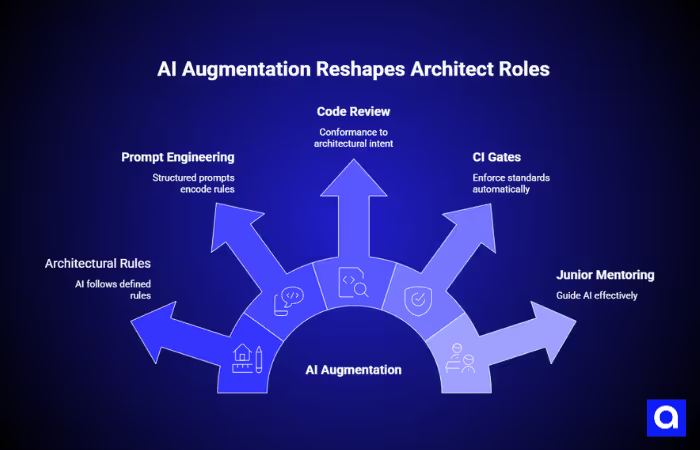
This is no less work than traditional architecture. It is different work, more explicit, more structured, and with higher leverage. A set of architectural rules that takes a senior engineer two days to define can shape an AI-assisted team's output for months.
What Junior Developers Need to Learn
The widespread availability of AI coding tools has created a genuine risk for early-career developers: the ability to generate working code without understanding it. This matters because understanding allows a developer to know when generated code is wrong, and AI-generated code can be wrong in ways that look correct on the surface.
Junior developers using AI effectively need a foundation in software architecture, data structures, security principles, and system design, not to write everything from scratch, but to evaluate what the AI produces. The developers who will be most valuable in an AI-augmented world are those who understand the system deeply enough to direct AI well and catch its mistakes reliably.
Architect-Led AI Development
To use AI effectively in professional software teams, you need clear architectural rules, structured prompting, and enforcement mechanisms that keep generated code aligned with the standards of a real production system.
Define Architectural Rules Before Prompting
The single most important practice in architect-led AI development is establishing explicit architectural rules before AI tooling is integrated into the workflow. These rules should cover:
- Layer structure: how the application is organized (e.g., controllers, services, repositories, domain models)
- Dependency direction: which layers may depend on which others
- Interface contracts: how layers communicate (e.g., typed DTOs, not raw database objects)
- Security controls: authentication, authorization, input validation, secrets management
- Error handling: how errors are caught, logged, and surfaced to users
- Testing requirements: minimum coverage thresholds, test naming conventions, what must be unit-tested vs integration-tested
- Performance constraints: response time budgets, query complexity limits, and caching rules.
These rules should be written down, version-controlled alongside the code, and referenced in every AI interaction. They are the foundation that makes AI output consistent, maintainable, and safe.
Structure Your AI Interactions
A prompt that says “build me a user authentication system” will produce code. A prompt that says “build a user authentication service conforming to the following architectural rules: [rules], using the following patterns: [patterns], with these security requirements: [requirements] will produce code that fits your system.
Effective AI prompting in professional contexts is a skill. It involves:
- Providing architectural context in every generation prompt
- Specifying the interfaces that the generated code must conform to
- Requiring tests as part of the output
- Asking the AI to explain its architectural choices, not just produce code
- Iterating on constraints when the output deviates from your standards.
Build Governance Into Your Pipeline
Architectural rules are only as valuable as the enforcement mechanisms behind them. In AI-augmented workflows, automation does the heavy lifting:
- Static analysis and linting tools enforce naming conventions, layer rules, and code style automatically
- Security scanning tools (SAST, dependency analysis) catch common vulnerability classes in every pull request
- Test coverage gates prevent code from merging unless it meets defined thresholds
- AI-powered code review tools can flag deviations from architectural patterns before human review begins
The result is that human reviewers can focus on judgment: Is this the right design? Does this fit the system’s long-term trajectory? , rather than convention enforcement.
Managing the Prototype-to-Production Transition
One of the most common mistakes for AI-first startups is treating a prompt-driven prototype as a foundation for further development. In reality, it rarely is. Code generated without architectural rules often lacks the structure necessary to support the features, scale, and security requirements of a production system.
The correct approach is to treat the prototype as a proof of concept and a specification. It demonstrates that the product idea works and captures requirements in concrete form. The production system should then be built by an architect-led team, using the prototype only as a reference, not as a starting point.
If your prototype was created with prompt-driven tools and you are moving toward a full product, involve experienced engineers to evaluate what can be retained, what must be rebuilt, and which architectural rules need to be established before new development begins. This assessment is an investment that typically pays for itself many times over.
Comparison: Development Lifecycle by Mode
The differences between prompt-driven, architect-led AI, and traditional development become much clearer when you compare them stage by stage.
The table below shows how each mode performs across planning, code generation, debugging, testing, security, deployment, maintenance, documentation, and long-term velocity.
The Bottom Line
AI is a multiplier, not a replacement. While it can accelerate prototyping and early development, it does not replace engineering discipline.
Instead, the teams that get the most from AI are the ones that pair it with strong architectural standards, governance, and experienced leadership. Teams like Azumo bridge this gap by providing skilled developers who review AI-generated code, enforce architectural standards, and lead engineering efforts end-to-end.
Ultimately, the real advantage comes not from using AI alone, but from using it to produce fast, correct, secure, and maintainable software.
Frequently Asked Questions

About the Author:
Head of Delivery
Mauricio Besse | Head of Delivery at Azumo



.avif)